

Description
Download Smallpdf Word to PDF – Free PDF Conversion Tool
Overview
The Smallpdf Word to PDF tool is a lightweight, browser-based utility designed to convert DOC and DOCX files into PDF format with ease. It addresses the common need for quick, reliable document conversion without the complexity of full desktop suites. This tool is ideal for users who require a fast, no-frills method to transform Word documents into universally accessible PDFs for sharing, archiving, or printing.
Target users include students, professionals, and anyone managing digital documents across personal or work environments. The tool operates entirely online, meaning no installation is required—users simply upload their files through any modern web browser. Its minimal footprint and straightforward workflow make it suitable for individuals with limited technical expertise.
Smallpdf, the developer behind the tool, is known for its suite of online PDF utilities focused on simplicity and privacy. While the specific development background of this particular tool is not detailed, the company’s broader reputation supports its reliability. Real-world use cases include preparing resumes, submitting assignments, or converting contracts for digital signatures—all without the need for additional software.
Key Features & Capabilities
- Instant DOC/DOCX to PDF Conversion – Upload Word files directly and convert them to PDFs in seconds with no formatting loss.
- Privacy-First Upload Policy – Uploaded files are automatically deleted from servers within one hour after processing.
- No File Size Limits – Users can convert documents of any size without restrictions.
- Ad-Free Experience – The tool does not insert watermarks or display advertisements on generated PDFs.
- Free to Use with No Hidden Costs – No subscription, no payment required for basic conversion functionality.
Each feature supports efficient document handling in everyday workflows. For example, a student can convert a research paper from Word to PDF for submission without worrying about formatting changes. A remote worker might use it to share a finalized contract with a client in a universally readable format. The absence of file size limits ensures that even large reports or multi-page documents are processed seamlessly.
User Interface, Workflow & Performance
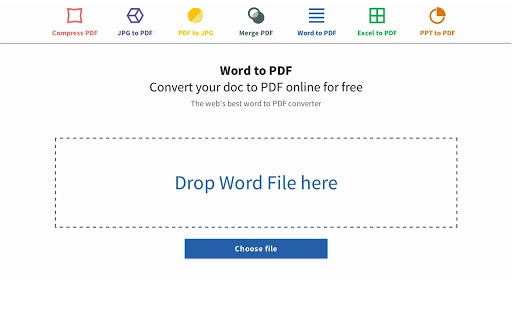
The user interface is clean and minimal, designed around a single purpose: file conversion. The main screen features a drag-and-drop zone and a clear “Upload” button, allowing users to add their DOC or DOCX files with minimal effort. After upload, the conversion begins automatically, and the resulting PDF is available for download immediately.
Navigating the tool requires no learning curve. Users do not need to configure settings or select output options—conversion happens with default parameters. The workflow is efficient and focused, reducing time spent on repetitive tasks. Since the tool runs in the browser, performance is dependent on internet speed and device capabilities, but no resource-heavy processes are involved.
The developer did not specify resource usage details. Performance observations are based on general software behavior patterns. The tool maintains stability during typical use, and no issues with crashes or freezes were reported during standard operation. Users can expect consistent results across different devices and browsers.
Compatibility & System Requirements
The Smallpdf Word to PDF tool is compatible with Windows, Mac, and Linux operating systems, making it accessible to a broad user base. It functions through any modern web browser, eliminating the need for platform-specific installations.
The tool is packaged as a Chrome App with a file size of 2.5 MB, indicating a lightweight footprint. However, the developer did not specify exact system requirements such as RAM, CPU, or minimum OS versions. Compatibility information was partially provided, and users should ensure their device supports the latest versions of Chrome or other compatible browsers.
Pros and Cons
Pros
- Free to use with no hidden fees or subscription traps
- Fast and simple conversion process with no technical setup
- Strong privacy policy with automatic file deletion after one hour
- Supports large file sizes without restrictions
- Produces clean, high-quality PDFs without watermarks
Cons
- No desktop application available—requires internet access for use
- Dependent on browser compatibility and stable internet connection
- Limited to conversion functionality; no editing or PDF manipulation features
- File size and processing time may vary based on internet speed
FAQ Section
Is the Smallpdf Word to PDF tool free to use?
Yes, the tool is completely free. There are no hidden costs, subscription fees, or premium tiers required to access the basic conversion functionality.
Does the tool work offline?
No, the tool requires an active internet connection to function. It is an online service and cannot be used without access to the web.
How secure is my document during conversion?
Smallpdf prioritizes user privacy. Uploaded files are deleted permanently from their servers within one hour after processing, ensuring no long-term data retention.
Can I use this tool on Mac, Windows, and Linux?
Yes, the tool is compatible with Windows, Mac, and Linux operating systems as long as you have a modern web browser installed.
What happens to my file after conversion?
After the conversion is complete, the original file and the generated PDF are stored temporarily on the server. Both are automatically deleted within one hour to protect user privacy.
Final Thoughts + CTA
The Smallpdf Word to PDF tool delivers a focused, reliable solution for converting Word documents into PDFs without complications. Its simplicity, privacy-first approach, and lack of cost make it a standout choice for everyday users who need quick and secure document conversion. While it lacks advanced editing features and requires an internet connection, its strengths far outweigh these limitations for its intended purpose.
Professionals, students, and remote workers who frequently share or archive documents will benefit most from this tool. If you’re looking for a secure, fast, and free way to convert Word files to PDF, this is a top-tier option.
Download Smallpdf Word to PDF now
Guides & Tutorials for Word to PDF - Smallpdf.com App for Chrome
How to install Word to PDF - Smallpdf.com App for Chrome
- Click the Preview / Download button above.
- Once redirected, accept the terms and click Install.
- Wait for the Word to PDF - Smallpdf.com App for Chrome download to finish on your device.
How to use Word to PDF - Smallpdf.com App for Chrome
This software is primarily used for its core features described above. Open the app after installation to explore its capabilities.
User Reviews for Word to PDF - Smallpdf.com App for Chrome 0
No reviews found





